Back to School Flyer Template PSD
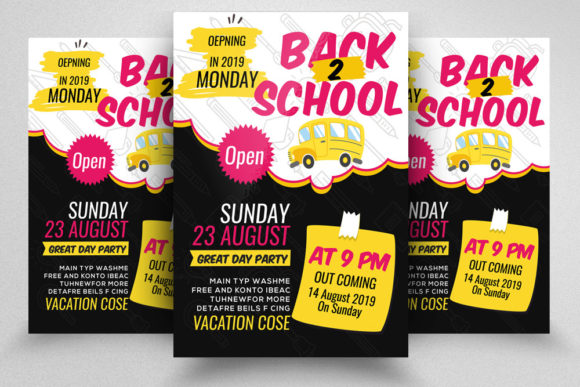
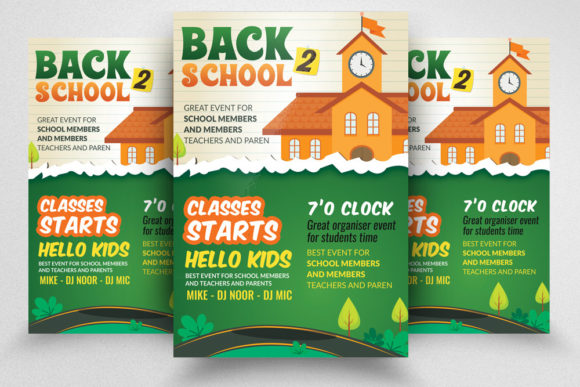
A new school year brings fresh energy, new goals, and a surge of communication needs. For educators, administrators, small business owners, and creative professionals, the ability to produce polished, attention-grabbing materials quickly can make a real difference. The Back to School Flyer Template PSD offers a practical foundation for creating professional flyers that resonate with students, parents, and the wider school community. Designed with production-ready specifications including CMYK color mode, 300 DPI resolution, a standard 8.5×11 inch size with 0.25 inch bleed, this template bridges the gap between creative vision and print-ready output. Understanding what this template offers and how to adapt it for your specific context can save time, elevate your materials, and help you connect with your audience more effectively.
What Makes This Template a Solid Starting Point
A good template does more than save time—it enforces good practices. The Back to School Flyer Template PSD is built around industry-standard specifications that ensure your final print piece looks professional and consistent. Here is what the file delivers out of the box:
- CMYK color mode ensures accurate color reproduction when printed, avoiding the dull shifts that can happen with RGB files sent to commercial printers.
- 300 DPI resolution guarantees sharp text and crisp images, essential for flyers that people will hold and read up close.
- 8.5×11 inch size with 0.25 inch bleed gives you a standard letter-size format with proper margins, so background elements extend cleanly to the edge after trimming.
- Easily customizable editable text layers let you change headlines, body copy, dates, and contact details without affecting the rest of the layout.
- Smart object layers allow you to place your own images simply—double-click, insert, save, and the flyer updates instantly.
- Well-organized layers with clear naming make it easy to find exactly what you need, whether you are tweaking a color or swapping a photo.
- Free fonts are used, so you do not need to purchase additional typefaces to match the original design.
- The package includes a help text file with instructions, making setup straightforward even if you are newer to Photoshop.
These features remove technical friction, allowing you to focus on message and design rather than file setup and print specifications.
Exploring Creative Applications Across Different Contexts
While the template is built around a back-to-school theme, its clean structure and professional finish make it adaptable for a variety of uses. The key is understanding who you are speaking to and what action you want them to take.
School and District Communications
For public and private schools, the template works well for orientation event announcements, open house flyers, supply drive promotions, after-school program sign-ups, and parent-teacher conference reminders. The editable text layers let you swap out dates, locations, and contact information quickly. If your school has a brand color palette, you can update the template colors to match while keeping the layout balanced. Using the smart object layer for a photo of the school building, a welcoming classroom, or a group of students adds authenticity and warmth.
Tutoring and Educational Services
Independent tutors, learning centers, and enrichment programs can use this template to announce fall session enrollment, subject-specific workshops, or study skills seminars. The professional file format signals credibility to parents who are evaluating options for their children. Consider using a clean, straightforward typography approach and including a clear call-to-action such as “Register Now” or “Limited Spots Available.” The 8.5×11 size is easy to post on community bulletin boards, hand out at school events, or include in welcome packets.
Small Business Promotions
Local businesses that cater to students and families—bookstores, stationery shops, uniform suppliers, tech retailers—can adapt the flyer for back-to-school sales, discount events, or product launches. The template’s organized layer structure makes it simple to replace school-themed imagery with product photos or lifestyle shots. Keeping the CMYK color mode ensures that promotional flyers printed in-house or at a local print shop maintain consistent, vibrant colors. A small business owner might use the flyer as a social media graphic by exporting a JPEG version, extending the template’s value beyond print.
Community and Nonprofit Campaigns
Nonprofit organizations hosting school supply drives, backpack giveaways, or mentorship program recruitment events can rely on the template for clear, compelling communication. The smart object layer makes it easy to include a powerful image of community members or volunteers. The well-organized layers allow volunteers with basic Photoshop skills to update text and images without accidentally breaking the layout. This reduces stress for small teams with limited design resources.
Freelancers and Designers
For creative professionals working with education clients, this template can serve as a rapid prototyping tool or a base for customization. You can present a client with a polished draft in minutes, then refine colors, typography, and imagery to match their specific brand. The included instruction file also makes it easy to hand off the final PSD to a client who may want to make minor updates themselves. Using a template like this for routine projects frees up time for more complex creative work.
Practical Recommendations for Clear, Effective Results
Getting the most out of the Back to School Flyer Template PSD involves more than just changing text and images. A few intentional choices can make your final piece more persuasive and professional.
Prioritize Readability
Because flyers are often scanned quickly, keep headlines short and body copy concise. Use the editable text layers to write a clear benefit-driven headline—something like “Get Ready for a Great Year” or “Fall Registration Now Open.” Avoid cramming too much information; if you have multiple details, consider a bulleted list or a simple grid. The template’s organized layer structure supports clean layouts, so resist the urge to add too many extra elements.
Choose Images That Communicate Emotion
The smart object layer is a powerful feature, but the image you place matters. For school-related flyers, choose photos that feel genuine rather than overly staged. A real classroom scene, a diverse group of students, or a close-up of school supplies can evoke positive emotions. For business or community flyers, select images that reflect your specific audience and context. Avoid generic stock photos that feel disconnected from your message.
Maintain Brand Consistency
If you are representing a school, business, or organization, use the flyer as an opportunity to reinforce brand identity. Update the template’s color palette to match your logo and other materials. Use the same fonts or choose a complementary pair from the free fonts provided. Consistent use of brand elements across print and digital communications builds recognition and trust.
Plan for Print and Digital Use
The 300 DPI resolution and CMYK color mode make this template ideal for professional printing, but you can also repurpose it for digital channels. Export a high-quality JPEG or PNG for social media posts, email newsletters, or website announcements. Just remember that for screen use, you may want to convert a copy to RGB and adjust contrast slightly, as CMYK colors can appear different on monitors.
Exploring Variations and Stylistic Approaches
Even with a fixed template, there is room for creative variation. Consider these approaches depending on your audience and tone.
- Bold and energetic: Use vibrant accent colors, large typography, and dynamic imagery to convey excitement about the new school year. Great for younger audiences and family-oriented events.
- Clean and minimal: Stick to a limited color palette, generous white space, and simple iconography. Works well for tutoring services, academic programs, and professional development announcements.
- Warm and welcoming: Choose soft, inviting colors like warm yellows, soft blues, or gentle greens. Use images of smiling faces and welcoming environments. Ideal for orientation events, meet-the-teacher nights, and community gatherings.
- Modern and bold: Experiment with geometric shapes, asymmetrical layouts within the template’s structure, and high-contrast color combinations. Suitable for tech-focused programs, innovative schools, or brands that want to stand out.
The well-organized layers in the PSD make it safe to experiment—you can always revert to the original if a direction does not work. Try different color schemes using adjustment layers or by changing the color of specific elements. Swap out background textures or gradients to shift the mood without affecting the core layout.
Keeping Your Work Organized and Repeatable
One of the overlooked benefits of this template is the layer organization. When you save a customized version, maintain that structure by naming new layers clearly and grouping related elements. This makes future updates faster and reduces errors. If you are creating a series of flyers—for different grade levels, events, or terms—you can duplicate the PSD file and swap out only the content that changes. The consistent format also helps your audience recognize your materials across different touchpoints.
The included instruction file is a small but valuable addition. Even experienced users should skim it, as it may contain tips about specific free font requirements or recommended print settings. Passing this file along to a colleague or client who is less familiar with Photoshop can save them from common pitfalls.
Ultimately, the Back to School Flyer Template PSD is a tool that supports both creativity and efficiency. Whether you are a teacher organizing a classroom event, a marketer promoting a retail sale, or a freelancer delivering a client project, the careful specifications and thoughtful layer structure give you a solid foundation. Focus on clear messaging, authentic imagery, and consistent branding, and the template will help you produce flyers that inform, engage, and inspire action. Thanks for considering this resource—and when it works well for you, a rating is always appreciated.